01 · Tables
The floor, at a glance
Every table on every floor, coloured by what's happening: free, seated, reserved. Tap one to open its order, move a party to another table, or print its KOT again.
Billing — Tables

The restaurant POS that runs your counter, kitchen and tables as one system — over your own network, with or without internet.
Builtforrestaurantsthatrunontickets,tablesandtightservice.Captainsorderatthetable,thekitchengetstheKOTthemomentit'splaced,andthecounterbillsinseconds.
Friday · every table full
Twelve KOTs open. A queue at the counter.
to bill a table once the order is in
working off the same order, menu and settings
to pay on one bill — cash, UPI and card
of internet needed to bill and print KOTs
The captain takes the order on an Android phone. It lands on the counter the moment they tap send.
Each item prints at its own station — tandoor, bar, Kitchen-1 — and shows up on the kitchen screen, oldest first.
One tap to bill. Split it across cash, UPI and card, print it, or send it on WhatsApp.
Takings, top items and the payment split update as bills settle — on the dashboard and the owner app.
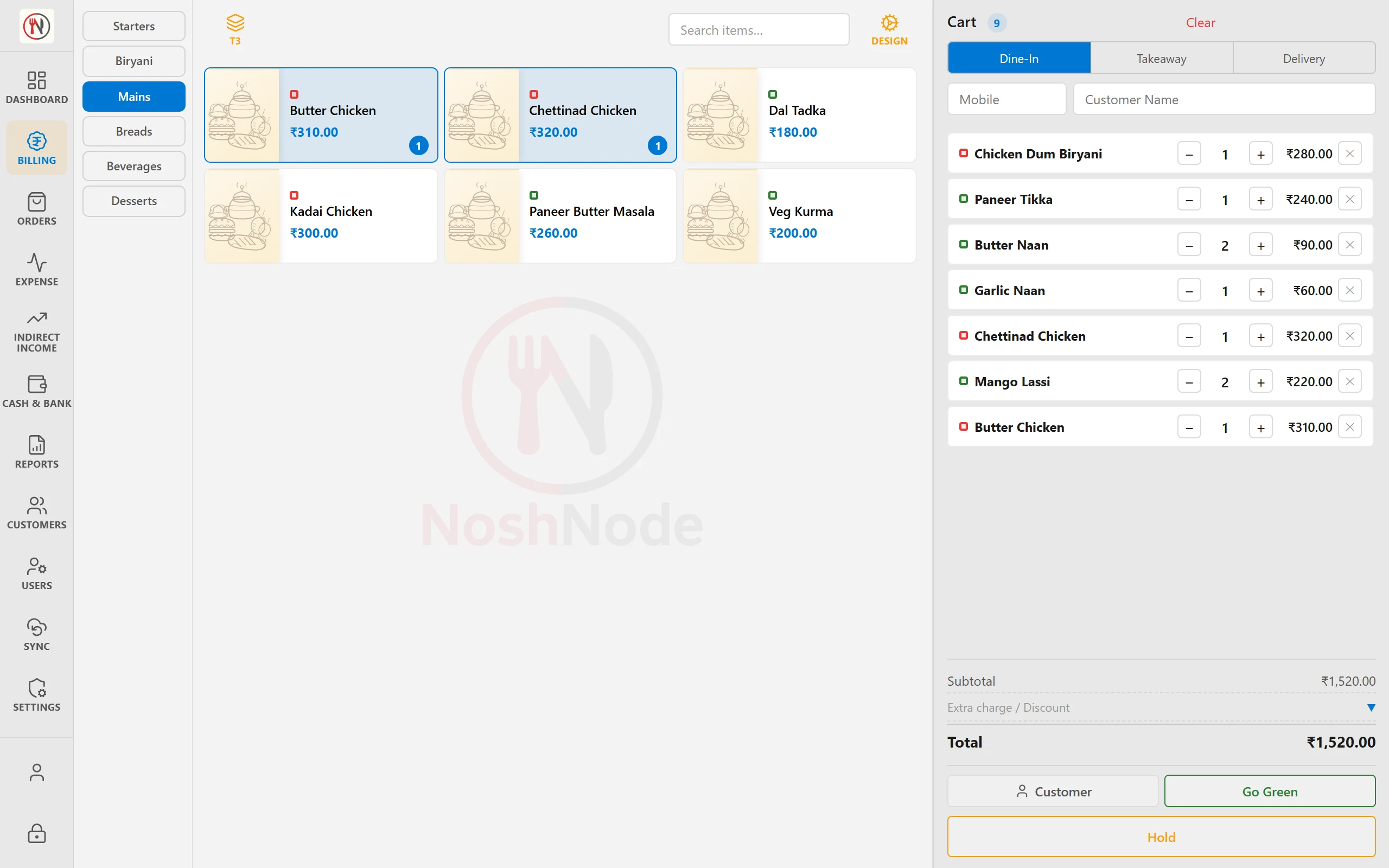
Scroll through a demo bill for table T3 — it builds itself as you go.
Tap T3 on the floor plan. The order the captain sent from the table is already on it.
Dessert ordered at the last minute? Add it at the counter — the kitchen gets its own KOT for it.
Apply a discount and GST is worked out for you: CGST and SGST, or IGST, inclusive or exclusive.
Part cash, the rest on UPI or card. Every rupee is recorded against the cashier who took it.
Print on the thermal printer or send the bill to the guest's WhatsApp. T3 turns free on the floor plan.
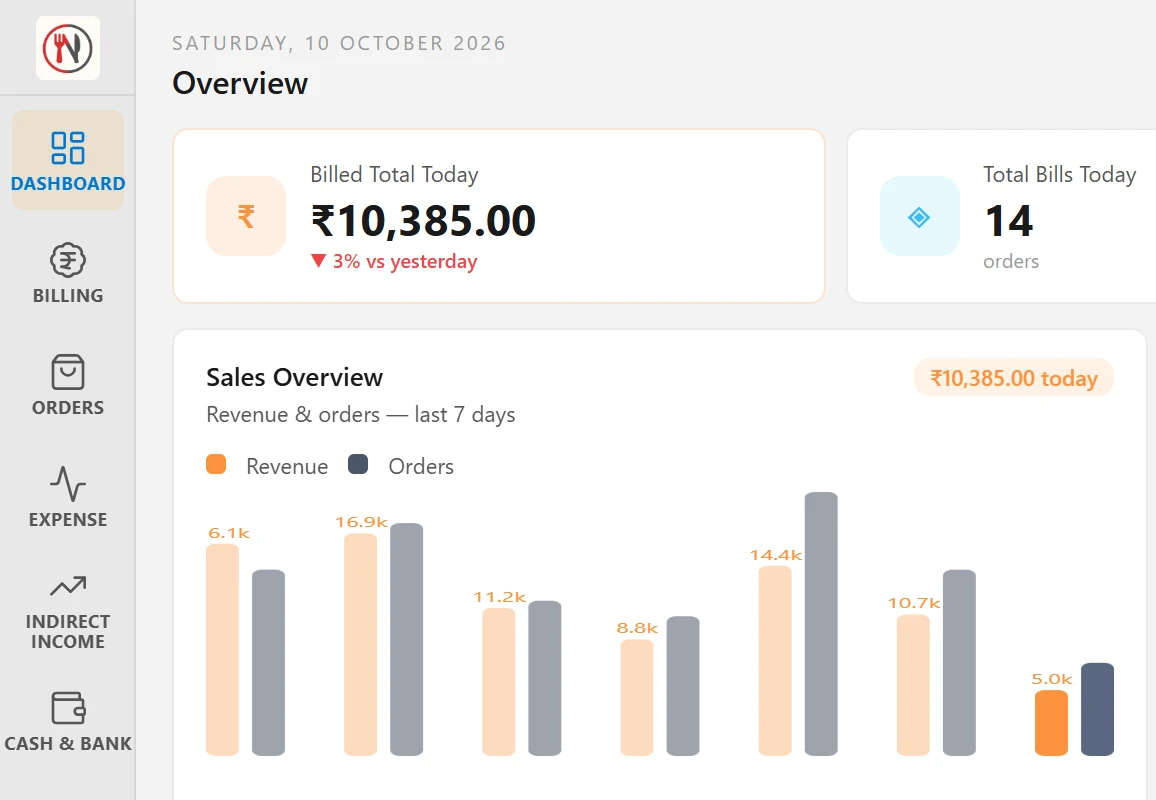
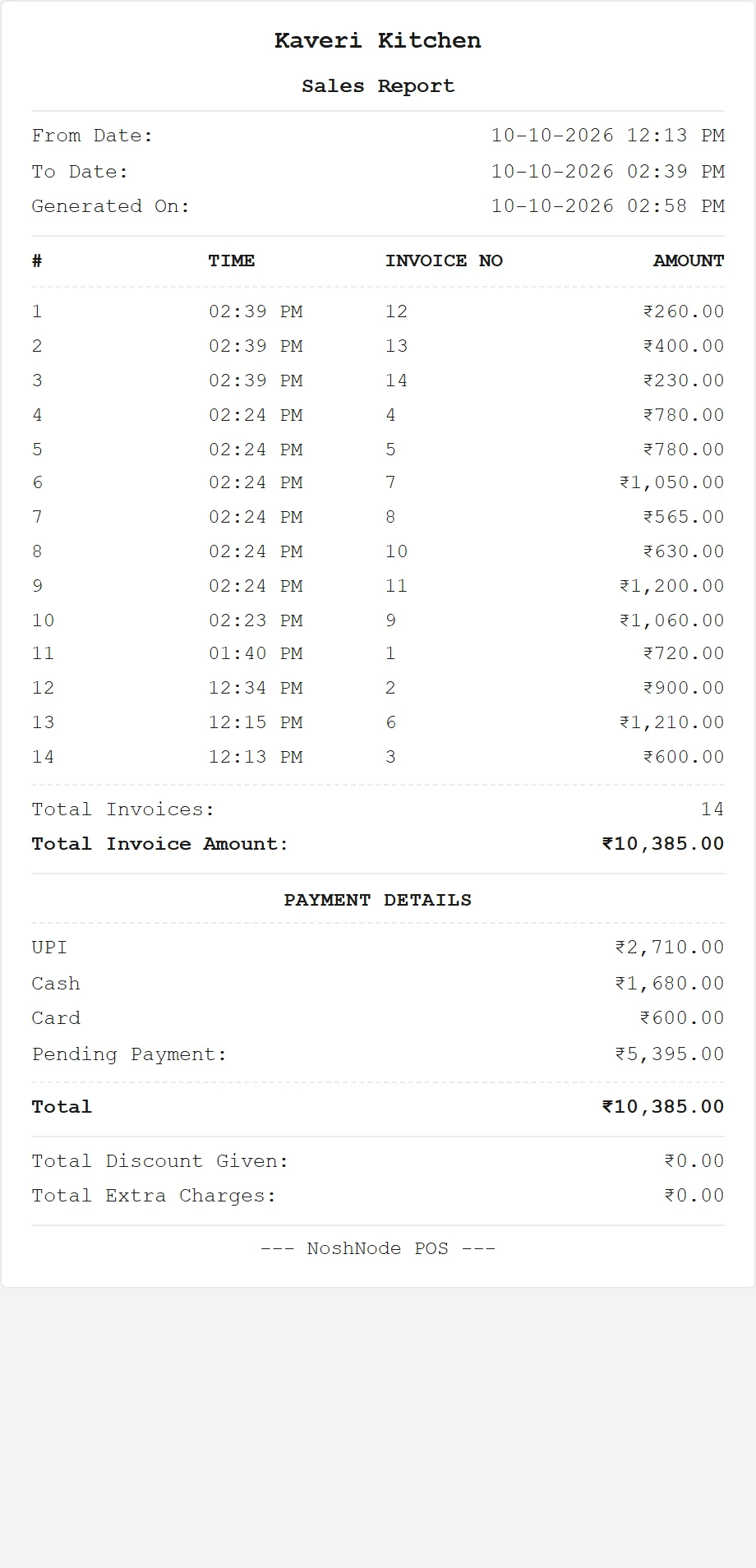
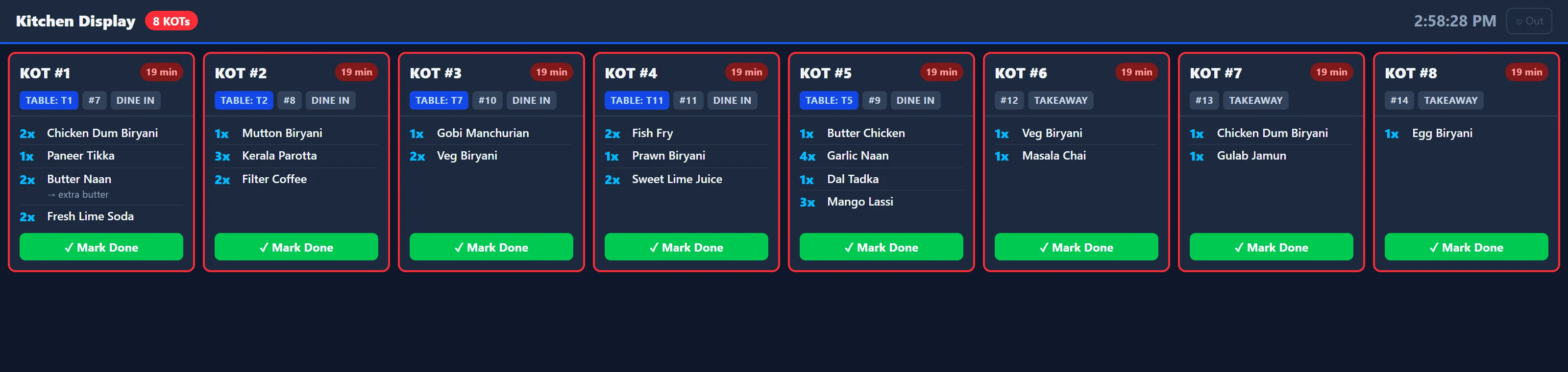
The screens below come from NoshNode as it ships, running a demo restaurant. No mock-ups.
Every table on every floor, coloured by what's happening: free, seated, reserved. Tap one to open its order, move a party to another table, or print its KOT again.
The dashboard updates as bills are settled: takings, bill count, seated tables, top items and the payment split. The last seven days sit beside today, so a slow lunch is obvious before dinner starts.
The day-end report lists every invoice and splits takings by cash, UPI and card, with pending bills, discounts and extra charges below. Print it on the counter's thermal printer, or export a PDF for the accountant.
Orders from the counter and the captain app arrive on the kitchen screen as KOTs, oldest first. Notes like “extra butter” come with them. Tap Mark done and the order moves on.
Assign a KOT printer to each menu category. Breads print at the tandoor, drinks at the bar, and the bill at the counter, all from a single order.
Put a TV near the pickup counter and open the customer screen. Orders show as preparing, then switch to ready when the kitchen marks them done.

Keep scrolling to wipe the old way off the table.
Written at the table, walked to the kitchen, sometimes lost on the way.
Totals and GST added up by hand while the guest waits.
Closing means counting cash and matching it to a page of numbers.
When the internet drops, the counter stops.
The captain taps send and each item prints at its own station.
GST worked out, split across cash, UPI and card.
Every invoice and the cash, UPI and card split, ready for the accountant.
When the internet drops, the counter keeps going.
Your data lives on the counter. Captain phones, kitchen screens and printers connect to it over the restaurant's Wi-Fi, not the internet, so billing and KOTs keep going during an outage. Anything waiting is uploaded once the line is back.
Try it — flip the switch.
Issue the day's stock to the kitchen. Add a special once at the parent outlet and every branch picks it up.
They all work from the same orders, menu and settings. Use whatever hardware you already own.
Windows PC
Billing, tables, KOT, back office, reports. The other devices connect to this one.
Android tablet or POS terminal
The same POS without a PC, for smaller counters and kiosks.
Android phone
Take orders at the table and send them to the kitchen.
Any browser on the network
Open KOTs, oldest first. Mark done when it leaves the pass.
A TV by the pickup counter
Order numbers, preparing and ready.
Phone
Sales, expenses, deliveries, staff and reviews across outlets.
Everything you need to get started, laid out like a recipe. Keep scrolling and the pages turn.
What you'll need, and the five steps between booking a demo and printing your first bill. Most of the equipment is probably in your restaurant already.
Keep scrolling to turn the page →
We put an order through with a few of your own dishes — table to kitchen to bill — so you see it with your menu, not ours.
We help you pick printers and devices, and use what you already own wherever it fits.
Categories, prices, GST, and which printer each category goes to. For chains we guide the setup and move your data across.
Captains, cashiers and the kitchen each learn their own screen. Chains get on-site staff training.
Start billing. While you're online, every change is copied to the cloud, and the owner app shows the day from anywhere.
“Everything runs on your own network, so a dropped internet line never stops service.”
Chef's note
Every plan starts with a free trial. Tell us how many outlets and counters you have, and we'll send a quote.
Cafés, QSRs and family restaurants
Brands with a few locations
Groups and franchises
Something else on your mind? Ask us directly.
Yes. Your data is stored on the counter device, and the captain app, kitchen screens and printers connect to it over your Wi-Fi or LAN. Billing, KOTs and tables keep running during an outage. Everything uploads to the cloud when you're back online.
Book a demo and we'll put your own menu through NoshNode — table to kitchen to bill — before your next weekend.
Send us your details, message us on WhatsApp or give us a call, and we'll set up a demo. Bring a few dishes and we'll put an order through from table to kitchen to bill.